anchr
A fast terminal UI for browsing S3 and S3-compatible object storage.
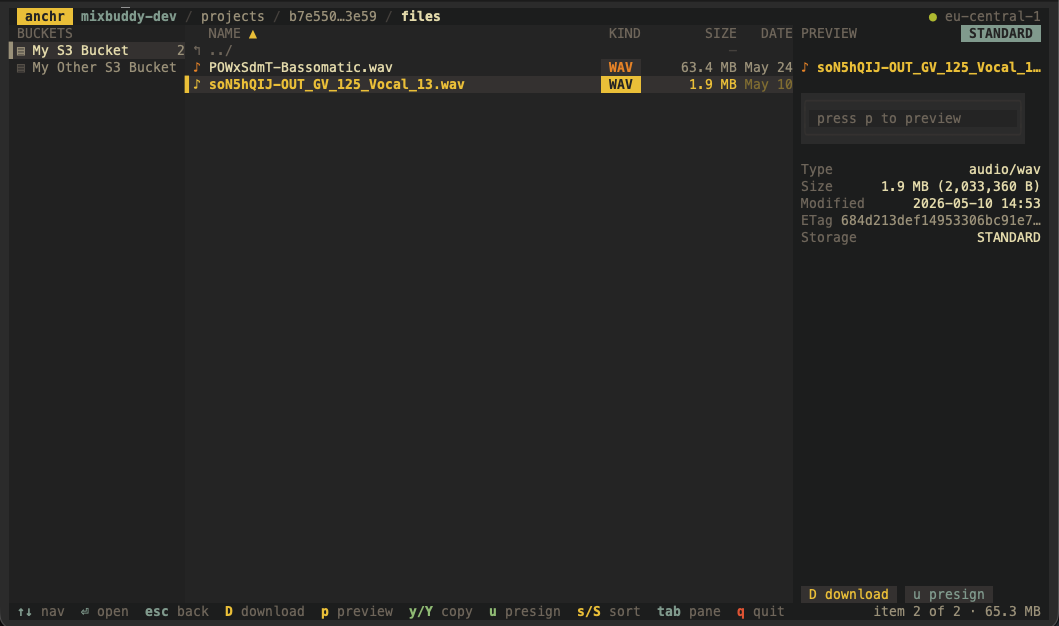
Features
- Browse multiple buckets from a single config
- Works with AWS S3 and S3-compatible stores (MinIO, Supabase, …)
- Keyboard-driven two-pane navigation (bucket sidebar + object browser)
- Download files straight from a bucket
- Preview file contents without leaving the terminal
- Copy object keys /
s3://URIs and mint presigned download URLs - Sort listings by name, size, or last-modified
- Optional prefix filtering to start inside a folder
- Single static binary, no dependencies
Install
Recommended — install the latest release with one command:
curl -fsSL https://anchr.jackjakarta.guru/install.sh | bash
Builds are available for Linux and macOS (amd64 and arm64). The script
verifies checksums and installs to /usr/local/bin (or ~/.local/bin). Useful
environment variables:
ANCHR_VERSION— install a specific version (e.g.v0.1.0), default: latestANCHR_INSTALL_DIR— install to a custom directory
Via homebrew:
brew tap jackjakarta/anchr
brew install anchr
From source:
go install github.com/jackjakarta/anchr@latest
Configuration
anchr reads ~/.config/anchr/config.yaml (override with --config or
XDG_CONFIG_HOME). Define one or more buckets:
buckets:
  # AWS S3 — uses the default credential chain (~/.aws/credentials, env, IAM)
  - name: "Production"
    bucket: "my-production-bucket"
    region: "us-east-1"

  # S3-compatible storage (MinIO, Supabase, …)
  - name: "MinIO"
    bucket: "dev-bucket"
    endpoint: "https://minio.internal:9000"
    region: "us-east-1"
    access_key: "..."
    secret_key: "..."
    path_style: true
    prefix: "images/" # optional starting folder
| Field | Description |
|---|---|
name |
Display name (defaults to bucket) |
bucket |
Bucket name (required) |
region |
AWS region (defaults to us-east-1) |
endpoint |
Custom endpoint for S3-compatible storage |
access_key / secret_key |
Explicit credentials (omit to use the default chain) |
path_style |
Use path-style addressing (required for MinIO) |
prefix |
Start browsing from this prefix |
Usage
anchr                  # launch the TUI
anchr --config <path>  # use a specific config file
anchr --version        # print version
| Key | Action |
|---|---|
↑/k, ↓/j |
move up / down |
enter/l |
open folder |
esc/h |
go back |
tab, ←/→ |
switch pane |
p |
preview file |
D |
download file |
y / Y |
copy key / s3:// URI |
u |
copy presigned URL |
s / S |
cycle sort field / reverse |
q |
quit |